
Touch Typing for Dyspraxia and Handwriting Difficulties in Children
By Mobile Occupational Therapist • 23 September 2026 • 12 min read
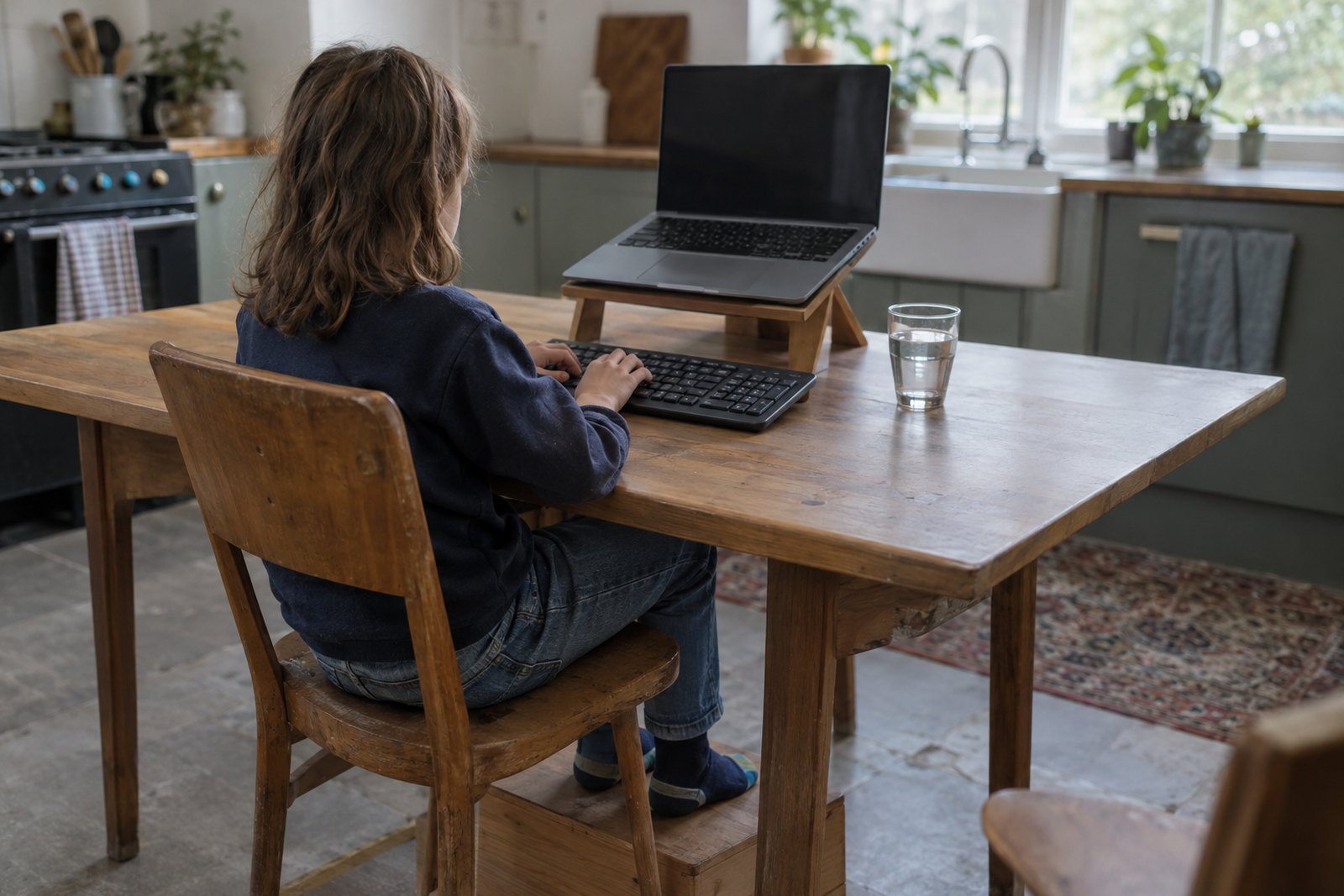
If your child's handwriting is slow, painful, messy or exhausting, learning to touch type is often one of the most useful things they can do. Touch typing means typing with all ten fingers, without looking at the keys, so the movement becomes automatic. For many children with dyspraxia (also called developmental coordination disorder), dysgraphia, hypermobility or dyslexia, it lets the words in their head reach the page without getting stuck in their hands.
Most children are ready to start somewhere around the age of seven to nine, once they know their letters and their hands can comfortably rest across the middle row of a keyboard. Short, regular practice works far better than long sessions: ten to fifteen minutes on most days, for several months. Typing does not replace handwriting entirely, and it is not a cure for anything. But for the right child it can be the difference between dreading every written task and actually showing what they know.
Why typing helps when handwriting is hard
Writing by hand asks a child to do several difficult things at once. They have to remember what they want to say, spell it, form each letter, keep it on the line, space the words, hold the pencil and keep their body still. If the physical part takes up most of their effort, there is little left for the thinking. That is why some bright, chatty children produce three lines in twenty minutes and look as though they have run a race.
Typing still involves movement, but the movement is simpler. Every letter is a press of a key rather than a shape to draw. Once it is learned, the pattern is the same every time, and the result is always legible.
Dyspraxia
Children with dyspraxia often find the planning and sequencing of letter shapes hard, and their writing may tire them quickly. Touch typing for dyspraxia is not a quick win, because typing is also a motor skill and they may take longer to learn it than their classmates. The payoff tends to come later, once the finger patterns are automatic. Be patient through the clumsy early weeks.
Dysgraphia
Dysgraphia describes a persistent difficulty with getting writing onto paper, whether that is forming letters, spacing, or organising the written words. If you are not sure whether this fits your child, our guide to dysgraphia signs in children and adults explains what to look for. For many children with dysgraphia, typing removes the barrier of illegible work almost at once.
Hypermobility and hand pain
Children with very bendy finger joints often grip the pencil hard to stay in control, and their hands ache after a short time. Typing uses lighter, quicker touches and spreads the work across all the fingers. It is not pain-free for everyone, though, and posture matters a great deal (more on that below).
Fatigue and slow writing
Some children have no diagnosis at all, they just write slowly and tire quickly. Others have conditions that cause fatigue. Either way, if your child cannot keep up with copying, note-taking or timed work, typing can protect their energy for the learning itself.
Dyslexia
Typing will not fix spelling, but it helps in other ways. Work is easy to edit, so children can get ideas down first and correct later. Some children find that typing common words over and over builds a reliable finger pattern for them. A spellchecker can help with homework, although it is not always allowed in tests.
When to start and how much practice
There is no strict starting age. Signs that a child is ready include:
- They know the letters of the alphabet and can read simple words.
- Their hands are big enough to rest on the middle row of keys with fingers slightly curved.
- They can sit and concentrate on one thing for about ten minutes.
- They are motivated, or at least willing. Forcing a reluctant child rarely works.
Younger children can still play around with a keyboard and find letters, which is useful familiarity. Older children and teenagers are never too old to learn, and they often progress faster because they understand why it matters.
Practice tips that genuinely help:
- Little and often. Ten to fifteen minutes, four or five days a week, beats an hour on Saturday.
- Accuracy before speed. Rushing builds bad habits that are hard to undo.
- No peeking. A light tea towel draped over the hands is an old trick that still works.
- Expect months, not weeks. Most children need a good few months of regular practice before typing feels easier than writing.
- Aim for one simple milestone. A sensible first goal is typing faster and more comfortably than they handwrite. Once they get there, it is worth using.
- Start using it for real. Short pieces of homework, a shopping list, a message to grandma. Practice that has a purpose sticks.
Stop the session if your child is in pain or close to tears. A good habit built slowly is better than a fight every evening.
Choosing a typing programme
There are plenty of typing programmes, and the right one is the one your child will actually use. Broadly, you will find:
- Free online courses with structured lessons, usually starting with the home row and adding keys one at a time.
- Game-based programmes that wrap the practice in races, levels and rewards. Good for motivation, but check that the game does not encourage hammering keys for speed.
- Multisensory programmes designed with dyslexia and dyspraxia in mind. These often speak letters and words aloud, use whole words early on, and let you change fonts and background colours.
- Programmes your child's school already uses. Ask, because using the same one at home and school saves confusion.
Whichever type you choose, look for:
- Short lessons that can be done in one sitting.
- The option to switch off timers and speed pressure.
- Adjustable text size, font and colour.
- Clear progress tracking, so your child can see they are getting better.
- No distracting adverts or pop-ups.
- That it works on the device and keyboard your child will use day to day.
Many paid programmes let you try them first. Do that before committing.
Setting up the keyboard and posture
A poor set-up can turn typing into a new source of aches. A few simple checks make a big difference.
- Feet supported. Feet flat on the floor, or on a sturdy box or footrest if the chair is too high.
- Elbows at roughly a right angle. Forearms should be level with the keyboard, shoulders relaxed rather than hunched.
- Wrists straight. Hands should float slightly above the keys, not bend up or rest heavily on the table edge.
- Screen at eye level. Laptops are a compromise because the screen and keyboard are joined. For longer sessions at home, raising the laptop and using a separate full-size keyboard helps a lot.
- A proper keyboard to learn on. Typing on a tablet's glass screen does not teach the same finger memory. A plug-in or wireless keyboard is worth having.
- Breaks. A stretch and a wiggle every twenty minutes or so keeps young bodies comfortable.
Handwriting set-up matters too, because your child will still write. A sloped surface can improve posture and control for some children, and our guide to writing slopes and how to set one up covers who benefits. For secondary school students who spend long periods at a laptop, the adult principles in our workstation set-up guide apply just as well to a teenager doing coursework at the kitchen table.
Using a laptop in school
Typing at home is one thing. Getting it accepted at school takes a conversation, and the person to talk to is usually the SENCo (special educational needs coordinator).
Agreeing it with the school
Ask for a meeting and come with specifics: how long it takes your child to write a paragraph, how they seem afterwards, what their typed work looks like compared with their handwritten work. Things to agree include:
- Who provides the device, and whether it is a school laptop or one from home.
- Where it is kept, how it gets charged and who is responsible if it breaks.
- How work is saved, shared and printed.
- Which lessons it is used in. Maths, science diagrams and art often still need a pen.
- How the rest of the class is told, if at all. Some children worry about standing out, so involve your child in this decision.
If your child receives SEN support, the laptop and typing practice can be written into their support plan. If they have an Education, Health and Care plan, it can be included there. Ask for a review date so you can check how it is going.
Exam access arrangements
For GCSEs and A levels, schools can apply for access arrangements such as using a word processor, extra time or a scribe. These follow rules set by the Joint Council for Qualifications, and a key principle is that the arrangement should reflect the student's normal way of working in school. In practice that means a child who has been typing in lessons for years has a much stronger case than one who switches in Year 11. Spelling and grammar checking is generally switched off for exams, so check this with the school.
Younger children's national tests also have access arrangements, which the school applies for. Rules change from time to time, so ask the SENCo or exams officer what applies and when decisions are made, and check current guidance on GOV.UK.
Keeping some handwriting
Typing is a tool, not a replacement. Your child will still need to sign their name, fill in forms, jot a quick note, label a diagram and handle situations where no device is available. Some exams and subjects will remain handwritten.
The aim is usually functional handwriting: legible enough, fast enough, for short tasks. That puts far less pressure on a child than trying to make them write neatly for an hour. Keep a little handwriting practice going, in short and enjoyable bursts. Our guides to handwriting practice activities that actually help and pencil grip by age have practical ideas that do not feel like extra homework.
Speech-to-text as another option
Speech-to-text (dictation) software turns spoken words into typed text, and it is built into most computers, tablets and phones. For some children it is even more freeing than typing, especially for long pieces of creative writing or for children whose fine motor difficulties make typing hard too.
It has limits. It needs a reasonably quiet room, which a busy classroom is not. Children need to speak clearly and say punctuation out loud. Errors still need correcting, which means reading the text back carefully. Many children end up using a mix: speech-to-text for first drafts at home, typing for editing and classwork, handwriting for short tasks.
Where an occupational therapist fits
An occupational therapist looks at why handwriting is hard, not just at the handwriting itself. That might mean assessing hand strength, coordination, posture, visual perception, sensory processing and how quickly your child tires. From there, they can advise whether typing, speech-to-text, handwriting help, or a combination is the most realistic route for your child.
A private occupational therapist visiting at home can also check seating and desk set-up, suggest practice routines that fit family life, and write a report setting out your child's needs and recommended adjustments. Schools often find a clear report helpful when planning support, and it can add weight to an EHCP request. The school, not the therapist, decides on exam access arrangements, but evidence of need and normal way of working helps.
Other professionals lead in some areas:
- Your GP is the first stop if your child has ongoing pain, numbness, tingling or a sudden change in how they use their hands. A diagnosis of dyspraxia is usually made by a paediatrician, often with therapy input, and the GP can refer.
- A specialist teacher or educational psychologist usually assesses for dyslexia.
- An optometrist should check vision if your child squints, loses their place or complains of headaches.
- A physiotherapist may lead if hypermobility is causing wider joint pain or affecting walking and sport.
Frequently asked questions
Is touch typing good for dyspraxia?
For many children with dyspraxia, yes. It takes longer to learn than for other children, but once it is automatic it usually needs less precise control than handwriting and always produces legible work. Build in patience, short sessions and plenty of encouragement.
Will typing stop my child learning to write?
It should not, provided some handwriting practice continues. Most children who type still handwrite short tasks every day. The aim is to stop handwriting being a barrier to learning, not to give it up.
Can the school refuse to let my child use a laptop?
Schools make their own decisions about classroom support, but they must use their best endeavours to meet special educational needs. If you feel your child's needs are not being met, ask for a meeting with the SENCo, bring evidence, and ask how the decision will be reviewed. GOV.UK sets out your options if you disagree.
Should spellcheck be switched on?
For homework and everyday work, usually yes, as it reduces stress and helps your child see corrections. In tests and exams it is often switched off, so it is worth practising some typing without it too.
Is a tablet as good as a laptop?
A tablet with a proper physical keyboard can work well. Typing on the glass screen does not build the same finger memory, so for learning touch typing a real keyboard is best.
My child hates practising. What now?
Try a game-based programme, keep sessions very short, and link typing to something they care about, such as writing about their favourite game or messaging a relative. If resistance continues, it may be worth an occupational therapy assessment to check whether something else is making it harder than it looks.
Next steps
If handwriting is holding your child back and you would like a clear picture of why, and what will help, an occupational therapy assessment is a good place to start. See our children's occupational therapy page, or current guide prices, and choose your area below.
Talk to an occupational therapist near you
This guide is general information. For advice about your own situation - or someone you look after - a local occupational therapist can visit you at home and see it for themselves.
Choose your area: