
Book Holders and Reading Stands: Reading Comfortably Again
By Mobile Occupational Therapist • 29 October 2026 • 14 min read
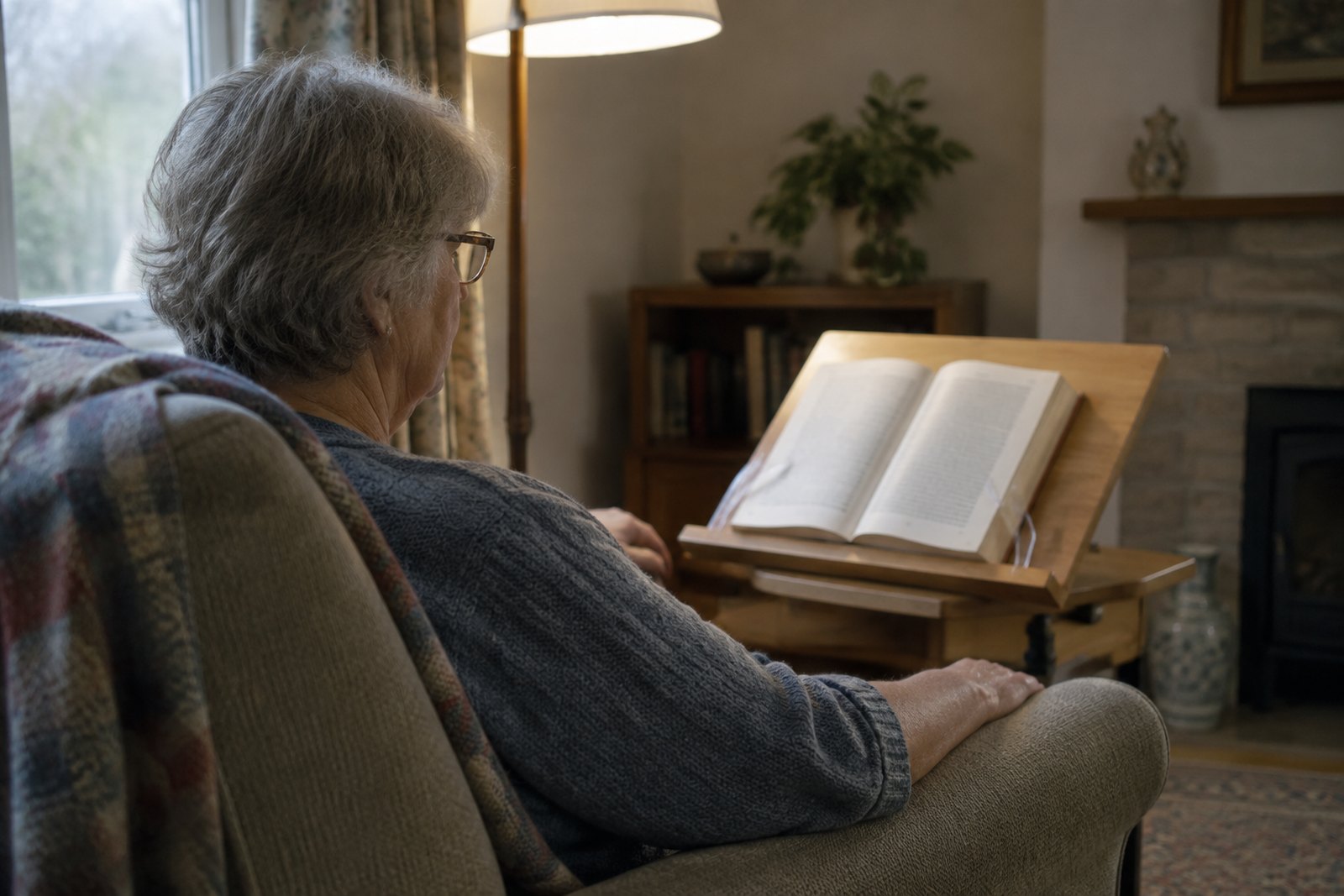
If holding a book has become tiring, painful or simply impossible, a book holder is usually the answer. It does the gripping for you. A reading stand holds the book open at a sensible height and angle, so your hands only need to turn the page, and sometimes not even that. There are stands for a table, for your lap, for bed and for one hand, plus small page clips and thumb holders that cost very little.
The right one depends on why reading has got harder. Stiff, sore fingers need something different from a shaky hand, a weak arm after a stroke, a stiff neck or failing eyesight. This guide goes through the main types, how to position a book so your neck and shoulders do not pay for it, how to make page turning easier, and when a tablet, e-reader or audiobook might suit you better than paper.
Why holding a book gets so hard
Holding a book open looks effortless. It is not. Your thumbs press outwards against the pages, your fingers grip the spine, your wrists hold the weight at an angle, and your shoulders keep the whole thing up in the air. Do that for an hour and most people would ache. Add a health condition and the hour becomes ten minutes.
Common reasons people stop reading include:
- Arthritis in the hands, especially the base of the thumb, which takes most of the pressure of holding pages flat.
- A tremor, which makes the words jump and the book wobble.
- Weakness or loss of use in one arm, often after a stroke, so the book has to be managed one-handed.
- Neck and shoulder pain, made worse by looking down at a book held in the lap.
- Reading in bed for long periods, through illness, recovery from surgery or simply because that is where you spend your day.
- Low vision, which means holding the book very close or using a magnifier, leaving no spare hand.
Many people give up quietly and assume reading is over for them. Usually it is not. The problem is almost always the holding, not the reading.
The main types of book holder
Desk and table stands
These sit on a table or desk. The simplest is a sloped board with a ledge along the bottom for the book to rest on, and clear plastic or metal arms that fold down to keep the pages open. Better ones let you change the angle and sometimes the height. They are steady, cheap and good for longer reading sessions at a table. Look for a wide base and non-slip feet, or put a piece of non-slip matting underneath.
Lap stands and cushion trays
A lap stand rests on your knees while you sit in an armchair. Some are a small sloped stand on a padded beanbag base that moulds to your legs. Others are a tray with a fold-up book rest. They let you read in your usual chair without holding anything. The catch is that they keep the book low, so you still look down. Raising them with a cushion helps.
Bed stands, over-bed tables and floor stands
For reading in bed or in a chair you rarely leave, there are stands that bring the book to you. An over-bed table with a tilting top can work as a large reading stand, and many have a small lip to stop things sliding off. There is more on these in our guide to over-bed tables and staying comfortable when you spend time in bed. Floor stands with an adjustable arm can hold a book or tablet at face height beside a chair or bed. Whatever you use, it must be properly tightened and stable, because a heavy hardback falling on your face is not a good end to a chapter.
Page clips and page holders
Sometimes the book sits fine on a table but the pages keep flipping shut. Page clips are spring clips that hold the pages down at each side. A weighted page holder is a soft, heavy strip that lies across the bottom of the pages and holds them flat. Both are cheap and useful alongside a stand, or on their own for a book lying flat on a table.
Thumb page holders
These are small rings, usually wood or plastic, with a flat wing on each side. You slip one over your thumb and the wings hold a paperback open, so you can read one-handed without straining your thumb against the pages. They are popular and genuinely handy. They are not for everyone: if your thumb joints are sore or swollen, a ring around the thumb can make things worse, and you still have to hold the book up.
Getting the position right to protect your neck and shoulders
A stand only helps if the book ends up in the right place. The most common mistake is buying a stand and then using it flat on a low coffee table, which puts the neck in exactly the position that caused the trouble in the first place.
Try this when you set up:
- Sit well supported first. Your back should be against the chair, feet flat on the floor or a footstool. In bed, sit up against a firm wedge or pillows rather than lying flat with the book overhead.
- Bring the book up, not your head down. The top of the page should be roughly at eye level or a little below. Raise the stand on a box, a few large books or an over-bed table if needed.
- Tilt the book towards you so your face is square to the page. A flat book makes you lean forward.
- Set the distance for your glasses. Reading glasses have a sweet spot. If you wear varifocals or bifocals you read through the lower part of the lens, so the book usually needs to sit a bit lower and be tilted more.
- Rest your forearms on armrests, a cushion or the table, so your shoulders are not holding your arms up.
- Put the light behind you, shining over your shoulder onto the page, not into your eyes. Good light reduces squinting and leaning in.
- Move every so often. Look up, roll your shoulders, change position. Even the best set-up stiffens you if you never shift.
If you read on your side in bed, a stand placed to the side at eye level is far kinder to your neck than propping a book on your pillow.
Turning pages when your hands will not cooperate
Once the book is held for you, turning the page is often the last hurdle. Some simple fixes:
- A rubber fingertip or thimble, the kind used for counting paper, gives grip on thin pages.
- A pencil with a rubber end can nudge a page over if your fingers are stiff or numb.
- Loosen a new paperback by gently flexing it open a few times, so the pages lie flatter and turn more easily.
- Choose lighter books. Paperbacks are lighter than hardbacks, and a stand matters less with a slim book.
- Turn pages from the bottom corner, which takes less force than the middle edge.
For people with very limited hand movement, for example with advanced motor neurone disease or a high spinal injury, there are electric page turners and switch-operated devices. These are specialist and can be expensive, so it is worth getting advice before buying. In practice many people in this position find a tablet with simple tap controls, or voice control, easier.
E-readers and tablets: when a screen is easier than paper
A lot of people resist this, and that is fair. Paper is nicer. But for hands and eyes that are struggling, a screen solves several problems at once:
- It is light and the same weight whatever the length of the book.
- Pages turn with a tap or a small swipe, not a pinch.
- You can make the text as big as you like, which means every book becomes large print.
- You can change the font, boldness, line spacing and background colour, and many tablets offer high contrast or white text on black.
- Many will read the text aloud when your eyes are tired.
Dedicated e-readers with a non-glare screen are lighter and easier on the eyes in bright light. Tablets are heavier but more flexible, with bigger screens and more accessibility settings. Either way, do not hold it. Use a case that folds into a stand, a tablet stand on a table, or a stand with a flexible arm clamped to a table or bedside unit. Check the settings menu, often under accessibility, for options such as larger text, magnification and reading aloud. Some tablets can also be set to ignore very brief or repeated touches, which helps if a tremor causes accidental page turns.
If a family member sets it up, ask them to write down the steps for changing text size and turning the screen on, in plain words, and leave them by the chair.
Listening instead: audiobooks and talking books
Audiobooks are not cheating. For many people they are the thing that brings stories back. Most local libraries lend audiobooks free, often through an app you can use on a phone or tablet, and can help you get started. If you have sight loss, RNIB runs a free library of talking books, giant print and braille; check their website for how to join. A simple player with big buttons can be easier than a phone.
Matching the aid to the problem
Arthritis in the hands
The aim is to stop your thumbs and fingers doing the pinching and gripping. A table or lap stand with page clips usually helps most. Avoid thumb rings if the base of your thumb is sore. Our guide to arthritis and your hands covers joint protection more widely, much of which applies to reading too.
Tremor
Put the book on something heavy and steady, ideally on a table rather than your lap, so your movement does not reach it. Rest your forearms on the table. On a tablet, larger text and tapping a wide area of the screen are easier than precise swipes. There are more ideas in our article on living with a tremor.
One-handed after a stroke
A stable stand with page clips frees your working hand to turn pages. Non-slip matting underneath stops the stand creeping away. A tablet is often easier still. After a stroke some people also find they miss words on one side of the page, or lose their place. This can be a vision or attention problem rather than a hand problem, so mention it to the stroke team, GP or an optometrist. A card or ruler under the line, or a coloured strip down the edge of the page, can help you find your place.
Neck and shoulder pain
Height and tilt matter more than anything else. A stand that lifts the book towards eye level, with your arms supported, often makes a bigger difference than any other change.
Reading in bed
Sit up rather than lying flat, use an over-bed table or a secure bed stand, and consider a light tablet or e-reader. Never prop a heavy book where it could fall onto your face or chest if you nod off.
Low vision
A stand frees both hands for a magnifier, and many people find a stand-mounted magnifier with built-in light easier still. Large print, tablets with big text and audiobooks all come into play. Our guide to low vision aids and living with sight loss at home goes into this in detail. Get your eyes tested regularly; many people, including everyone aged 60 and over, are entitled to a free NHS sight test, and the NHS website explains who qualifies.
How to choose a book holder
Before you buy, think about:
- Where you read. Table, armchair or bed decides the type more than anything.
- What you read. Fat hardbacks need a deep ledge and strong page arms. Paperbacks and magazines need clips that work on thin, floppy pages. Tablets need a proper holder that grips the device.
- Adjustability. Can you change the angle and height without tools and without strong fingers? Small, stiff knobs are no good with arthritis.
- Stability. A wide, heavy base or a firm clamp. Wobble defeats the point.
- Weight and size. Can you move it yourself, or will someone always need to set it up?
- The page arms. Clear arms let you read the words underneath. Check they are easy to lift.
Start cheap if you are unsure. A basic sloped stand and a couple of page clips will tell you a lot about what you actually need.
Where an occupational therapist fits, and who else to see
Most people can sort out a book holder themselves. An occupational therapist is useful when reading is one of several daily tasks that have become hard, or when the simple fixes have not worked. A private occupational therapist visiting at home can look at how you sit, your chair or bed set-up, your hands, your energy and your eyesight together, and suggest stands, positioning, tablet settings and other equipment that suits your situation. They can also look at the bigger picture, such as getting in and out of the chair you read in. Your council adult social care team may also be able to assess you for equipment.
An occupational therapist is not the right first person for everything:
- See an optometrist for blurred or changing vision, or to check your glasses suit the distance you read at.
- See your GP if neck pain comes with numbness, tingling or weakness in your arms, if a tremor is new or getting worse, or if hand pain and swelling are new.
- Ask for a physiotherapist through your GP for ongoing neck or shoulder problems that need treatment.
- Get urgent help if you have sudden loss of vision, a sudden drooping face, arm weakness or slurred speech. Call 999. For other sudden eye problems, call NHS 111.
Frequently asked questions
What is the best book holder for reading in bed?
Usually an over-bed table with a tilting top, or a sturdy stand designed to sit across or beside the bed, so the book is at eye level while you sit up supported. Avoid anything that balances on your chest or could tip onto your face.
Are thumb page holders good for arthritis?
Sometimes. They stop you pressing the pages open, which helps. But they sit around the thumb and you still hold the book up, so if the base of your thumb is painful a table or lap stand is usually kinder.
Can I get a book holder on the NHS?
Book holders are generally treated as small, low-cost items that people buy themselves, though it varies by area. If you have wider needs at home, ask your council adult social care team for an assessment, which may cover advice on small aids as well as larger equipment.
Is a tablet better than a book holder for low vision?
For many people, yes, because you can make the text very large and change the contrast. It still needs a stand so you are not holding it. Some people prefer audiobooks once reading becomes a strain. An optometrist or low vision service can advise on magnifiers too.
How high should a reading stand be?
Aim for the top of the page roughly at eye level or slightly below, tilted towards you, with your forearms supported. If you wear varifocals, the book usually needs to sit a little lower so you can read through the bottom of the lens.
My mum has stopped reading since her stroke. What should we try?
Start with a stable stand and page clips so she can read one-handed, and try a tablet with large text or audiobooks. If she is losing her place or missing one side of the page, mention it to her stroke team or GP, as that may be a vision or attention issue rather than a hand problem.
Next steps
If reading is one of several things that have become hard, an occupational therapist can look at the whole picture at home. See our equipment and aids page, or current guide prices, and choose your area below.
Talk to an occupational therapist near you
This guide is general information. For advice about your own situation - or someone you look after - a local occupational therapist can visit you at home and see it for themselves.
Choose your area: